blog + case study experiences & gamification

Designing with personas: how learner profiles boost engagement in asynchronous training

What cozy video games taught me about designing self-paced Excel training around one learner named Maddie.

By Diane Nguyen · Originally published · Updated · 5-minute read

Project snapshot

for hiring managers who want the quick version

my role
Learning designer: designed and built the module
audience
Digital marketing learners at COOP Careers
tools
Articulate Rise, Storyline, Excel
format
Self-paced pilot module, replacing live coach demos

The problem: live Excel demos varied by coach, and the program was moving to self-paced content.

The solution: a persona-driven scenario where learners use VLOOKUP and XLOOKUP to complete Maddie’s real marketing task.

1-minute read

Press start: choosing your learner persona

I love a good story, and I love a good game. As much as I immerse myself in instructional design, diving into learning theories and strategizing the next steps, I also spend part of my time playing cozy video games like Stardew Valley, Fields of Mistria, and Animal Crossing.

Some people argue that game design and instructional design go hand in hand (and to a degree, they do). But that’s not exactly the point here. What I find fascinating is the role-playing element of these games. Taking on a persona, even one that’s different from who you are in real life, creates a sense of autonomy and possibility. Suddenly, you feel like you can take on the world, tackle challenges, and fully immerse yourself in the experience.

The more I played, the more I started asking myself: Could this idea of adopting personas apply to my work as a learning designer? The answer is yes.

2-minute read

A real-world challenge: designing Excel training with personas

When I was working as a learning designer for digital marketing at COOP Careers, I faced a big challenge: How do I make technical training, specifically Excel, more engaging and hands-on while keeping it relevant to digital marketing?

Traditionally, we relied on alumni coaches to lead live Excel demos. While this gave learners someone to guide and interact with, it came with drawbacks. Not every coach felt fully equipped to teach Excel at a deeper level, which often led to uneven learning outcomes. At the same time, our organization was moving toward more asynchronous content for both flexibility and budget reasons. That left me asking: How do I create an asynchronous Excel experience that’s engaging, consistent, and directly tied to our program goals?

To solve this, I turned to learner personas. Instead of designing for a faceless group, I imagined one specific learner and built the training story around them.

PLAYER 1 SELECTED

learner persona

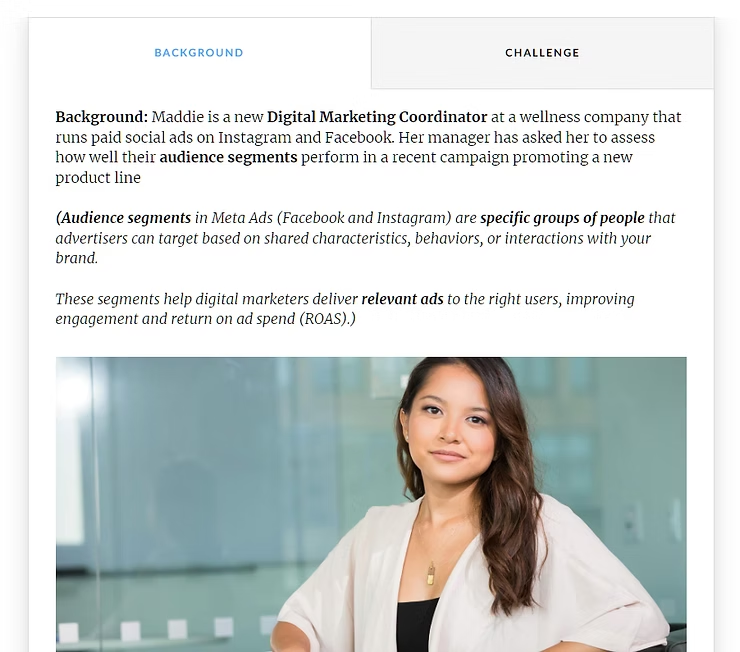
Maddie, the learner persona, shown in the course as a smiling young professional, below the start of her background story.

Meet Maddie

New Digital Marketing Coordinator at a wellness company

Maddie is smart, motivated, and eager to land her first full-time digital marketing role, but she’s intimidated by Excel. VLOOKUP and XLOOKUP feel like a foreign language to her, and she worries that not knowing them might hold her back.

Motivation
High
Excel confidence
Low

Quest: match each ad’s performance data with the right audience type so her manager can see how each audience is performing.

Designing through Maddie’s eyes

By anchoring the training to Maddie’s persona, I could walk through the experience from her perspective. What would make her feel confident enough to practice? What examples would feel relevant to her future career? What kinds of step-by-step hints would keep her from giving up if she hit a roadblock?

Using Maddie’s story, I piloted a small module on VLOOKUP and XLOOKUP. The content wasn’t just about the formulas; it was about Maddie solving problems that mirrored real digital marketing tasks, like pulling campaign data or matching performance metrics across spreadsheets. Framing the training through her lens transformed it from a technical exercise into a relatable, scenario-driven challenge.

2-minute read

Building the experience: from story to training

To bring Maddie’s story to life, I designed the module using a combination of Articulate Rise and Storyline. This mix allowed me to balance narrative, practice, and interactivity.

The training follows Maddie as she faces a challenge: She must match each ad’s performance data with the correct audience type so her manager can evaluate how different audiences are performing. Learners step directly into her shoes, immediately gaining access to the same raw dataset that Maddie is working with. From there, they follow along, mirroring her decisions and actions.

The culminating assignment is clear: learners must successfully use VLOOKUP and XLOOKUP to populate the raw data sheet, just as Maddie would. This transforms the training from a passive tutorial into a meaningful task with a deliverable that reflects real digital marketing work.

To support this journey, the module is layered with resources and practice opportunities:

  • support 1

    Concept explanations

    Clear, simple breakdowns of what VLOOKUP and XLOOKUP are, and why they save time compared to less efficient methods.

  • support 2

    Embedded Storyline activities

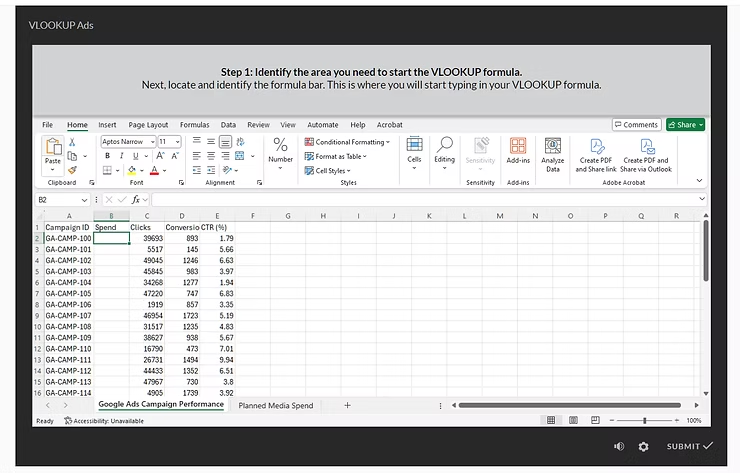
    Interactive “type-in” boxes and hotspot triggers, embedded in Rise, give learners multiple chances to practice formulas in different digital marketing scenarios, not just Maddie’s case.

    Storyline activity titled VLOOKUP Ads. Step 1: identify the area you need to start the VLOOKUP formula, then locate the formula bar. Below is an Excel sheet called Google Ads Campaign Performance with columns for campaign ID, spend, clicks, conversions and click-through rate, plus a Submit button.
  • support 3

    Bite-sized videos

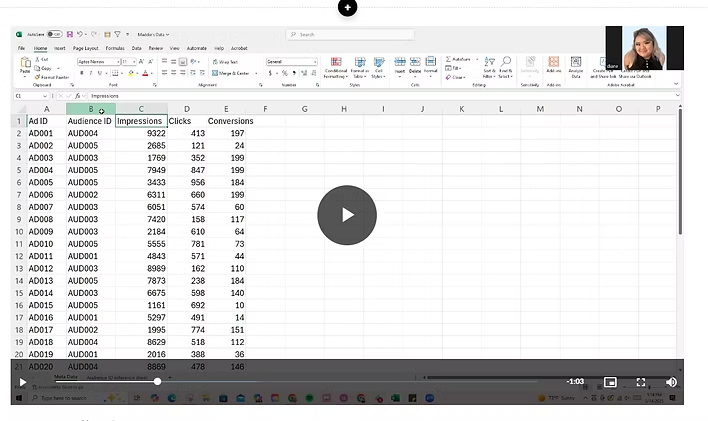
    Short, reusable clips show step-by-step demonstrations of the formulas, acting as both just-in-time guidance and a future refresher resource.

    Paused one-minute video of Diane demonstrating VLOOKUP, with her webcam in the top corner. The Excel sheet shows ad IDs, audience IDs, impressions, clicks and conversions for paid social ads.

The module closes by providing both the solution and the bigger picture: why mastering these functions matters and how they directly connect to digital marketing tasks like campaign reporting and audience analysis. Learners leave not only knowing how to do the formulas, but also why it matters to their role.

1-minute read

Reflection: why personas made the difference

Looking back, what made this Excel training successful wasn’t just the mix of tools or interactive elements; it was the decision to design around a learner persona. By creating Maddie’s story, I was able to anchor the training in a narrative that felt real and relevant. Instead of building content around abstract formulas, I was designing around Maddie’s goals, frustrations, and motivations.

This shift made a big difference. It turned the module into more than just a “how-to” guide; it became a problem-solving journey. Learners weren’t simply told what VLOOKUP or XLOOKUP could do; they experienced why it mattered through Maddie’s challenge. That framing gave them context and meaning, which boosted both engagement and retention.

Using personas also helped me navigate the reality of asynchronous training. Without a live facilitator to guide learners in the moment, the content itself had to do the heavy lifting. By anticipating where Maddie (and, by extension, our learners) might struggle, I could design supports, like embedded practice, bite-sized videos, and multiple scenarios, to keep momentum going.

Behind every dataset, deliverable, or formula is a real learner who wants to succeed.

Most importantly, Maddie’s story showed me that personas aren’t just a design “nice-to-have.” They’re a powerful way to bring empathy into instructional design, especially when building for asynchronous contexts. They remind us that behind every dataset, deliverable, or formula is a real learner who wants to succeed.
1-minute read

Conclusion: beyond Excel, the broader power of personas

Maddie’s story taught me that learner personas can do more than make a technical training module engaging; they can completely reframe how we think about designing for people. By giving learners a “face” and a story, personas help us anticipate needs, personalize content, and build empathy into the design process.

And their usefulness goes far beyond Excel. At COOP, I’ve applied personas in other ways too:

  • Client relationship management

    Crafting scenarios where learners step into the shoes of different client types to practice communication and problem-solving.

  • Mentorship training

    Using personas to represent different personalities that part-time staff might mentor, helping them prepare for diverse needs and approaches.

  • Journey mapping

    Designing persona-based pathways that show learners the “next steps” in their growth, making complex processes feel more approachable and actionable.

In each of these cases, personas acted as more than just a design tool; they became a way to create authentic, human-centered learning experiences.

select your character

So, whether you’re building asynchronous training, mentoring programs, or professional development pathways, try starting with a persona. Like in any good RPG, once you “select your character,” the journey becomes clearer, more meaningful, and a whole lot more engaging.